Proprietary server-side tracking
Show Meta who becomes a customer, not just who fills out the form.
Roasync sends your conversions to Meta from the server, through the Conversions API, and adds what happens after the form: appointments, show-ups and sales recorded in the CRM. So your campaigns see who actually becomes a customer. Even in healthcare, following Meta's rules.
1-week free trial, with guided setup.
- Works with
- Meta Conversions API
- Google Tag Manager
- WordPress
- WooCommerce
- Next.js
- GoHighLevel
- CRM webhooks
- Proprietary server-side tracking
- EU servers
- Native Meta CAPI
- GDPR-aligned
Why it matters
Meta optimizes for what it can see. Today it only sees the form.
If the last event Meta receives is the Lead, the algorithm looks for people who fill out forms. But a filled form is not a customer: some never pick up the phone, some never show up, some never buy. With Roasync, Meta also receives what happens next, with its value.
- Without CRM data
“Bring me more people who fill out the form.”
- With Roasync
“Bring me more people like these: they booked, they showed up, they paid.”
Example: out of 100 leads, 12 become customers. Without CRM data, Meta sees 100 identical forms. With Roasync, it also sees which 12 they are.
How it works
Three steps, from the website to Meta.
- 01Connect the website
Pick the method that fits the client: Google Tag Manager, the WordPress plugin or the Next.js package. Tracking runs on a subdomain of the client's own domain, for example server.yourdomain.com.
- 02Decide what reaches Meta
Rules are set from the panel, without touching the website: which event to send, under which name and with which value. Tracking follows the consent given in the cookie banner and drops duplicates.
- 03Connect the CRM
When a lead books, shows up or pays, the CRM tells Roasync through a webhook and the event reaches Meta with its value. From here, Meta sees who becomes a customer.
Installation
Three ways to install it, plus the CRM.
Every client runs a different stack. Pick the method in the panel and follow the guide, step by step.
- GTM
Google Tag Manager
For any website that already uses GTM. The container is served from the client's own subdomain (server.yourdomain.com), with an HTTPS certificate issued automatically.
- WORDPRESS
WordPress and WooCommerce plugin
On the website you only paste a token: everything else is configured from the panel. It tracks WooCommerce events, from product view to purchase, and leads from the most common form plugins: Contact Form 7, WPForms, Gravity Forms, Elementor Pro, Fluent Forms.
- NEXT.JS
npm package for Next.js
For landing pages built with Next.js, including on Cloudflare Pages. One component in the layout and one route: the token stays on the server and never reaches the browser.
- CRM
CRM webhook
Offline conversions arrive through a signed webhook. Compatible with GoHighLevel and with any CRM that can send a webhook. It also supports Click-to-WhatsApp campaigns, when the CRM passes the click identifier (ctwa_clid).
Not the one installing it? From the panel you copy ready-made instructions, filled in with the client's details, and hand them to the developer.
The plugin and the package are included: you get them from us when your account is activated.
The panel
See what goes out, what reaches Meta and what didn't work.
A separate workspace for each client, with tags, notes and search to find them fast.
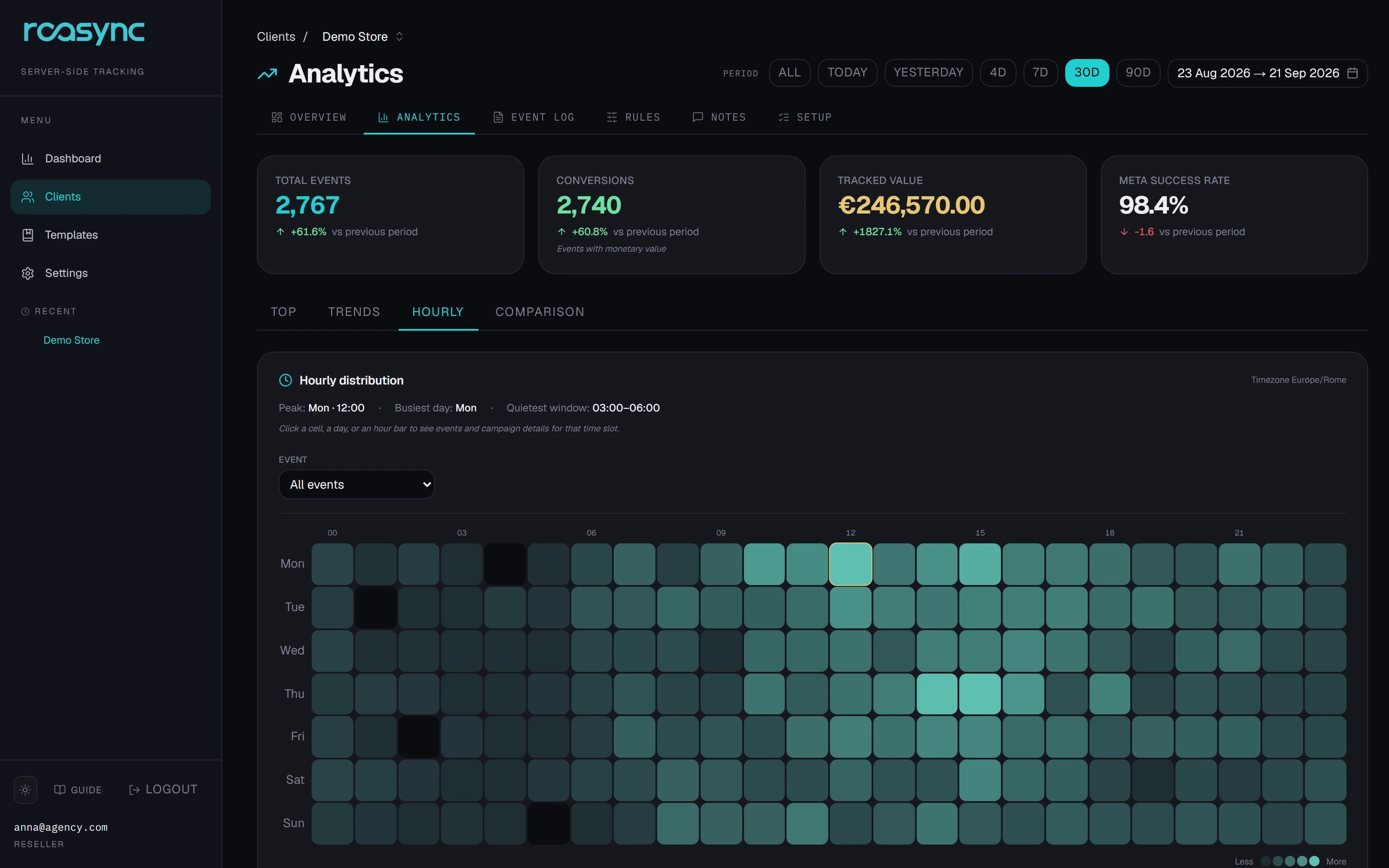
For each client you see events, conversions and tracked value, compared with the previous period. Then you drill down: campaign, ad set, creative, placement.
- A/B comparison between two campaigns or two ad sets
- Hourly map: which days and time slots bring conversions
- Attribution based on the UTMs collected by Roasync
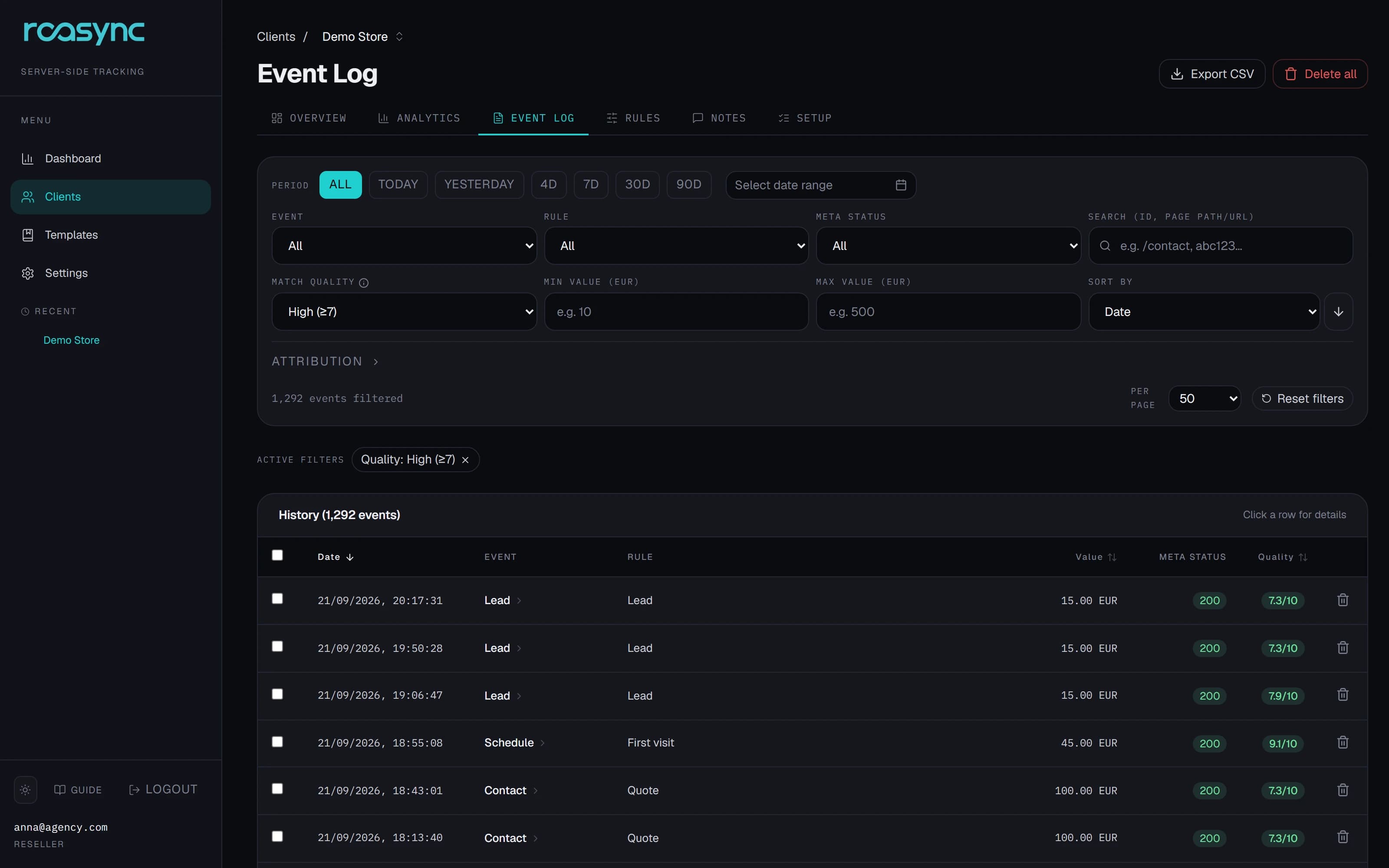
Watch events come in live. For each one: the rule that handled it, the parameters sent, the outcome and Meta's response. If something goes wrong, you see it right away and you know why.
- Estimated match quality, from 0 to 10, for every event
- Filters by event, outcome, value and campaign, with CSV export
- No personal data in plain text: only whether the parameter was there
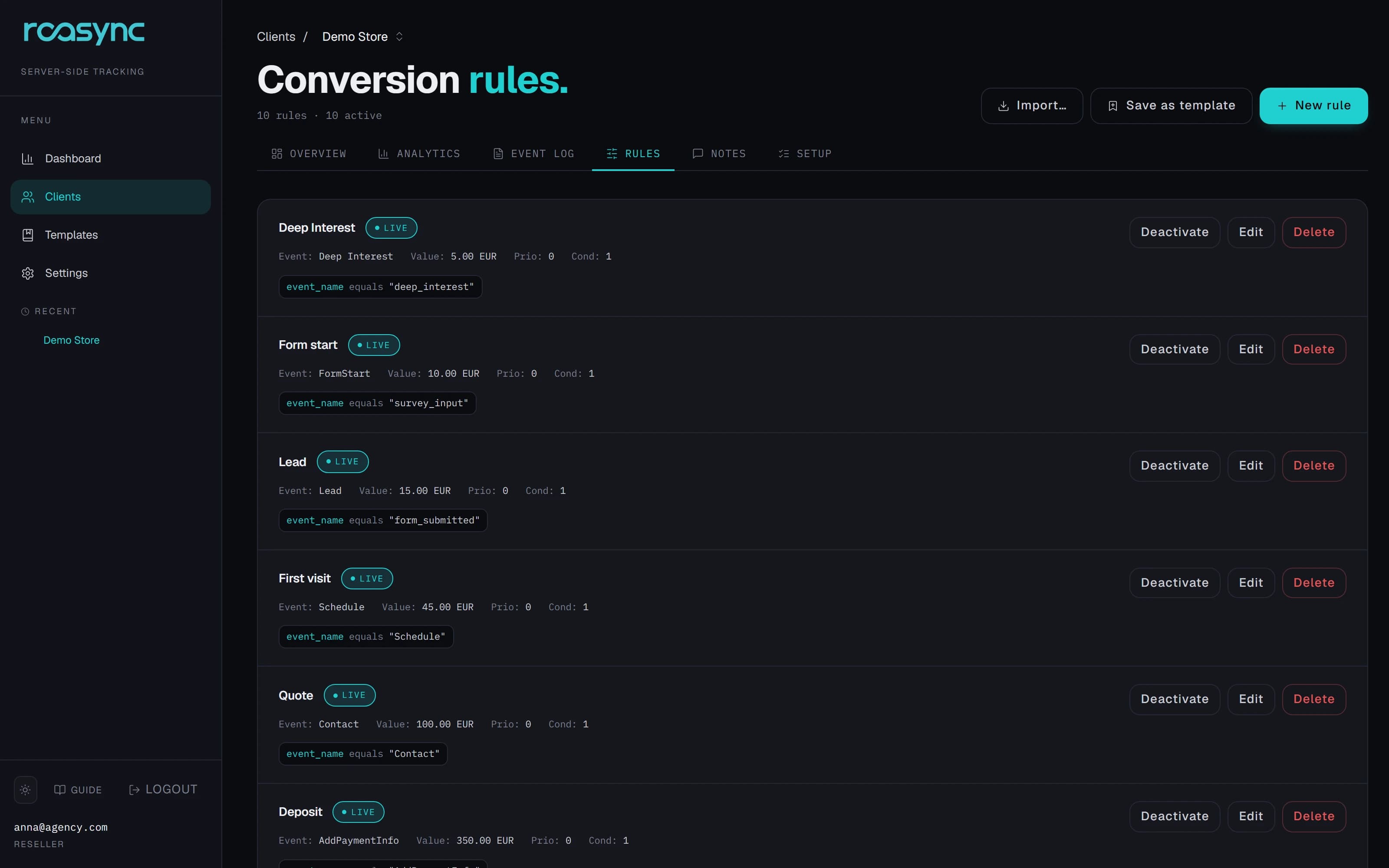
Rules are built in the panel: conditions, event to send, value and currency. You test them on a sample event before turning them on, without touching the client's website.
- 10 ready-made rules to import
- Reusable templates, and rules copied from another client
- You can also block an event: it never reaches Meta
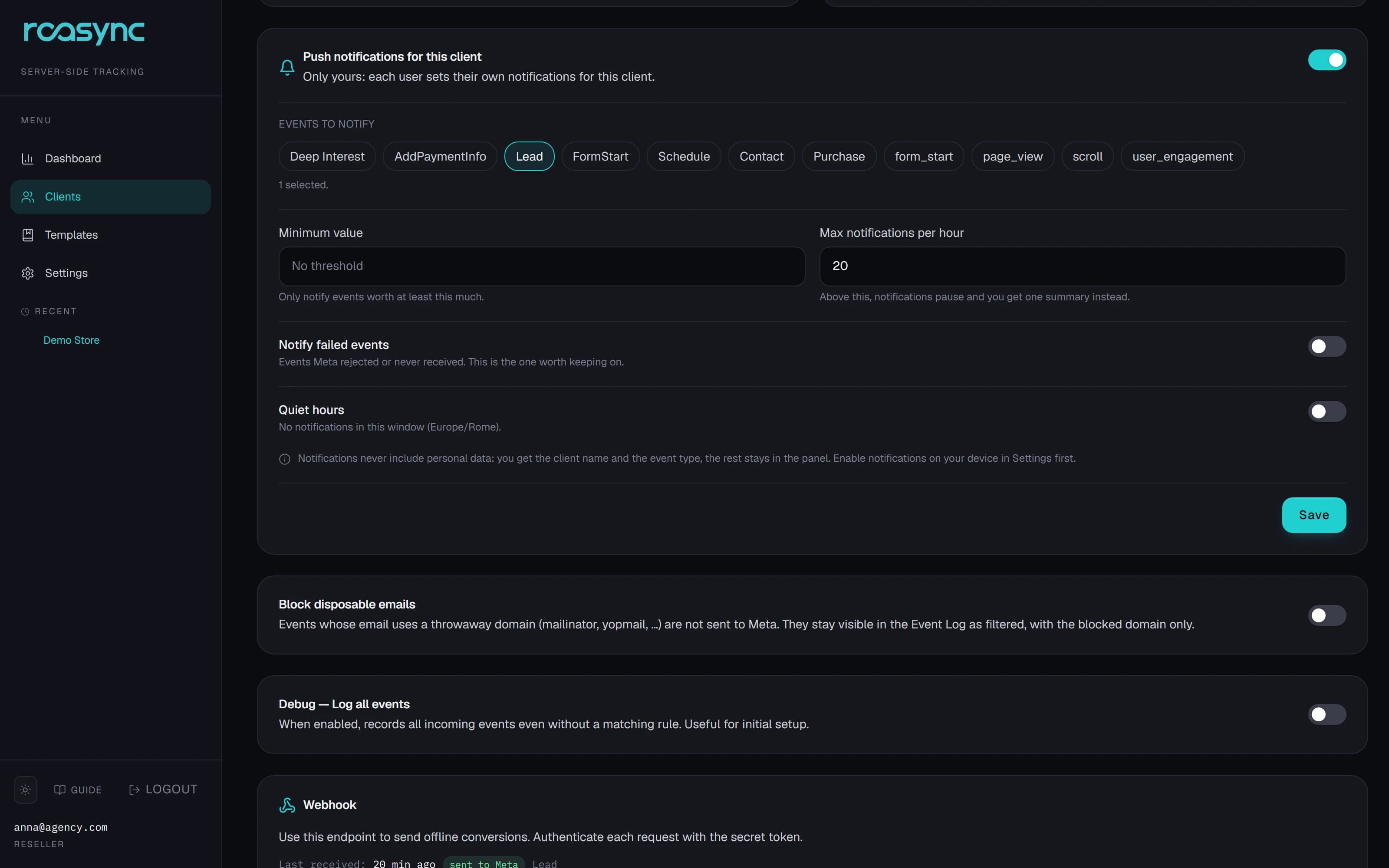
Push notifications on your phone or computer, set client by client: a purchase above a certain amount, a new lead, an event Meta rejected.
- Filters by event and minimum value
- Quiet hours and an hourly notification cap
- Notifications never contain personal data
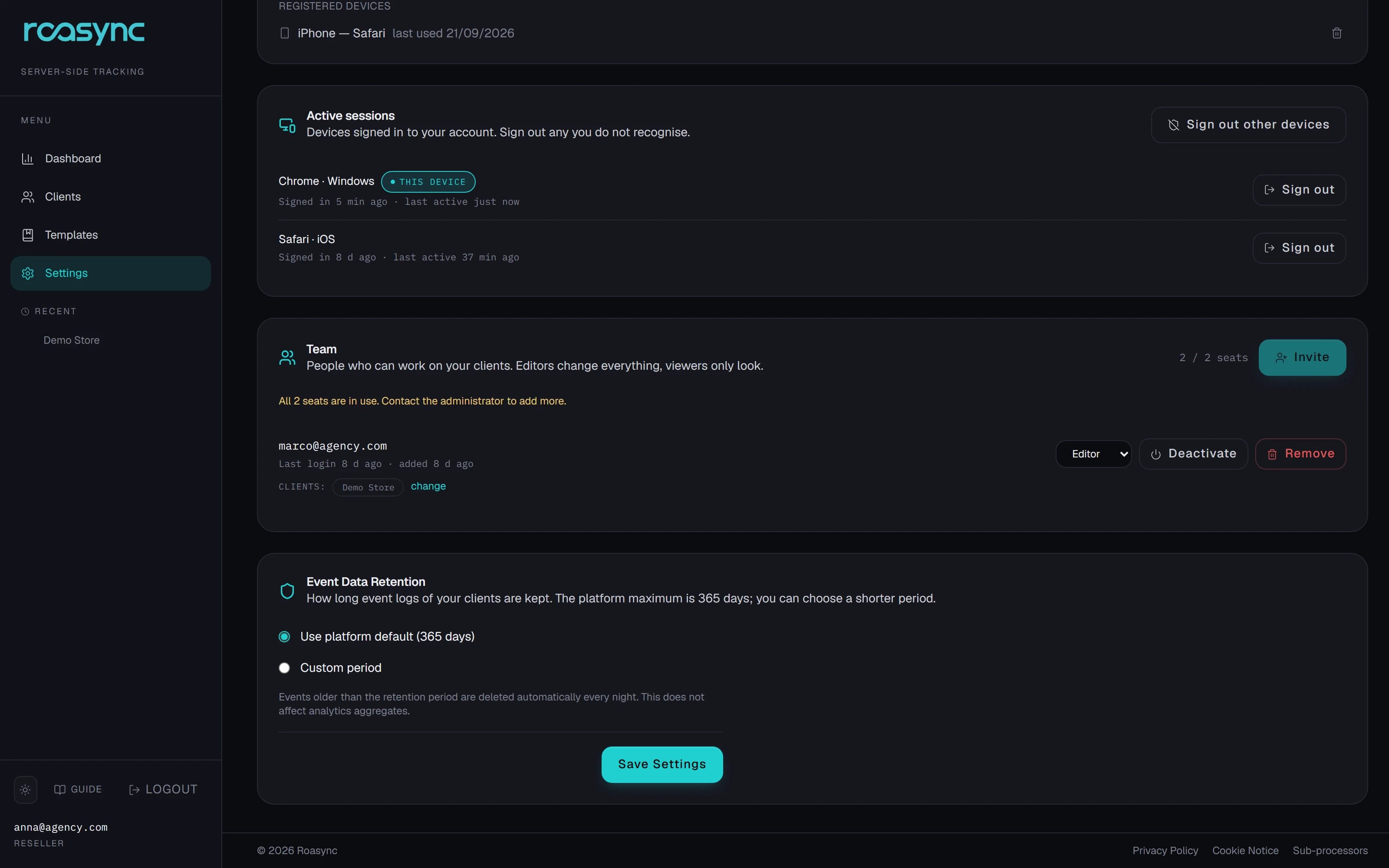
Invite colleagues and partners with two roles: Editor, who can change things, and Viewer, who can only look. For each person you choose which clients they see, so you can give read-only access to the client too.
- Viewers browse Analytics and the Event Log and cannot change anything
- Two-factor authentication
- Active sessions with remote sign-out
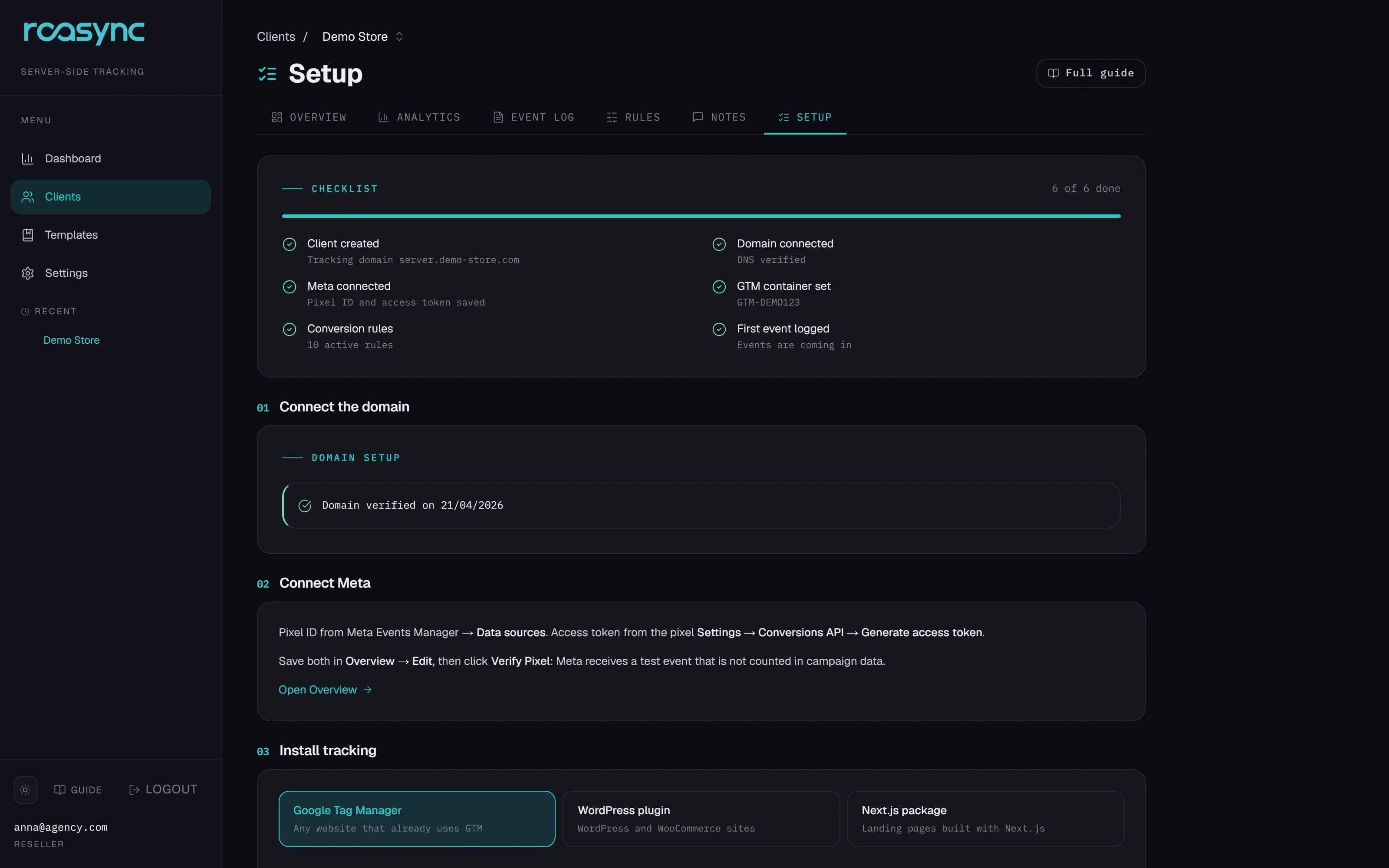
Each client has a checklist that updates itself: domain connected, Meta connected, tracking installed, rules live, first event received. The instructions already contain the right domain and token.
- DNS check from the panel, with diagnostics
- One-click test of the connection to Meta
- Full guide, with the most common problems and how to fix them
Healthcare and restricted sectors
In healthcare, Meta limits events. Your campaigns can keep optimizing.
When Meta classifies a data source as health-related, it limits lower-funnel events such as Lead, Schedule and Purchase. The result: campaigns that fall back on clicks and views, or on native lead forms, with lower-quality leads.
Roasync works as a compliance layer: Meta receives only the data its rules allow, cleaned before sending. So you can keep optimizing on landing page events and on the CRM outcomes the dataset can receive.
- 01Minimal dataNo treatment or condition names in the parameters: Meta receives only what its rules allow.
- 02Clean page addressesPage addresses are stripped of their parameters before sending, and only the expected fields go through.
- 03Setup reviewed togetherBefore going live, we check the healthcare client's configuration with you.
Good to know
Roasync is not a tool to bypass Meta's policies. If Meta applies full restrictions to a data source, blocking all events, no tracking solution can get them through.
Privacy and security
Built for those who handle sensitive data.
- 01
EU servers
The server that processes events is in the European Union.
- 02
Compliant with Meta's requirements
Before sending, personal data is handled the way Meta's Conversions API requires.
- 03
No plain-text personal data in the log
The event log holds no emails or phone numbers: only whether the parameter was present.
- 04
Configurable retention
You choose how long events are kept, within the platform limit. After that they are deleted automatically.
- 05
Consent read from the banner
Tracking follows the visitor's choice in the cookie banner and recognizes the main ones, including Iubenda, Complianz and CookieYes.
- 06
Protected access
Two-factor authentication, revocable sessions and an email alert on suspicious sign-ins.
The questions we get asked most.
Does Roasync replace the Meta Pixel?
It can work both ways. With the WordPress plugin and the Next.js package, events are sent from the server only, with no Pixel in the browser. With Google Tag Manager you can keep the Pixel alongside the Conversions API: events share the same identifier, so Meta counts the conversion once.
Will I recover 100% of lost conversions?
No, and no tracking solution can promise that. Sending from the server does not depend only on the Pixel in the browser, so it recovers a share of the conversions the Pixel misses (iOS limits, cleared cookies, browser blocking). Events coming from the CRM never go through the browser at all.
Is it compliant with Meta's healthcare policies?
Roasync works as a compliance layer: it sends Meta only the data its rules allow, cleaned before sending. It is not a tool to bypass the policies. If Meta applies full restrictions to a data source, blocking all events, no tool can get them through.
Which CRMs can I connect?
Any CRM or back-office that can send a webhook. The format is already compatible with GoHighLevel. The webhook is signed, and the panel always shows the date and outcome of the last one received.
How long does it take to get started?
It depends on the website. There are five steps: connect the domain, connect Meta, install tracking, turn on the rules, run a test. The checklist in the panel tells you where you are, and on your first clients we do the configuration together. The only wait outside your control is DNS propagation, which can take up to 24 hours.
Where is the data and how long do you keep it?
The infrastructure is in the European Union. Events are kept for the period you choose, within the platform limit, then deleted automatically. Personal data is sent to Meta in the format the Conversions API requires, and it never appears in plain text in the event log.
Can I give read-only access to a colleague or to the client?
Yes. Each person you invite has a role, Editor or Viewer, and sees only the clients you choose. Viewers browse Analytics and the Event Log and cannot change anything.
Does it work with Google Ads or TikTok too?
Today Roasync sends events to Meta. Integration with Google Ads and TikTok is planned.
How does the free trial work?
It starts with a 30-minute call: we show you the panel and see together whether Roasync is a fit. If it is, we activate your 1-week free trial on your domain, with guided setup.
1-week free trial
Show Meta your real customers.
Campaigns optimize on the data they receive. It starts with a 30-minute call: we show you the panel and, if it's a fit, we activate a 1-week trial on your domain.